Indelible Acts of Kindness
Skinny and Fatty
When I was a young kid about 8 years old, I remember watching a children’s short Japanese film called Skinny and Fatty. Here is a ChatGPT summary:
The story follows Oyama (“Fatty”), a timid, wealthy transfer student struggling with shame and isolation, and Komatsu (“Skinny”), a lively, resilient boy from a poor family who takes him under his wing. Rather than relying on simple tropes, the film focuses on their unlikely friendship—most iconically when Komatsu patiently helps Oyama conquer the dreaded gym rope climb.
After it was over, I went into our bathroom and just sobbed. Very few other films affected me this deeply as a young child. I still view it as one of the best short films I’ve ever seen.
Henry and Darla
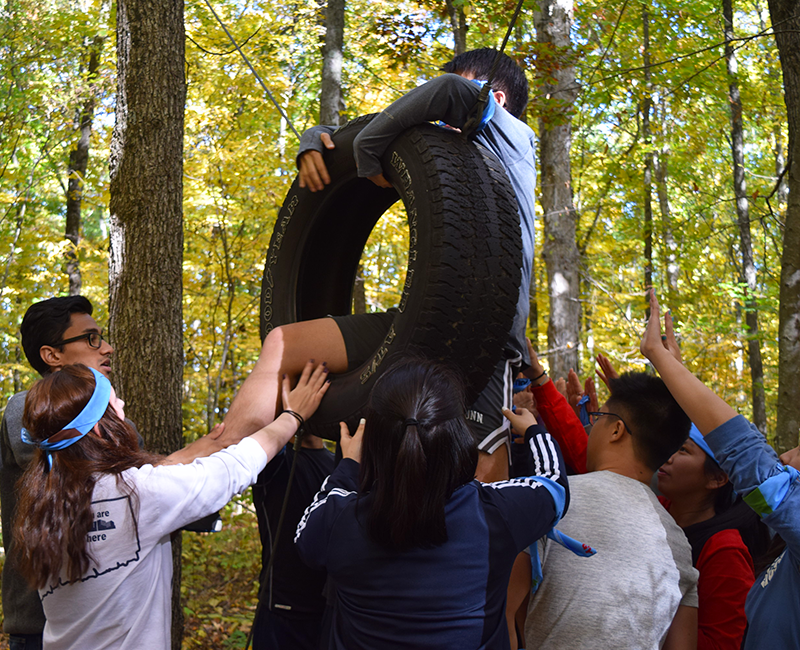
Years later as an undergraduate, one of the course requirements was to spend 5 days at an Outdoor Education Center, a sleep-away camp, being a counselor for a group of 6th graders. A focus of the camp was team building. One of the activities was called the Porthole. The entire team must pass through a single, vertically suspended hoop (the “porthole”) from one side to the other with imagined solid walls around the hole.

Thirteen year old Darla was part of the group. She was a bit older and bigger than the rest of the group and had some developmental disabilities. They were nice, but “normal” 6th graders. As such, they didn’t make fun of Darla but she wasn’t included in their informal interactions and discussions. During the Porthole activity the participants help each other through the tire due to its height, and the challenge, obviously, becomes getting the last person through it. Needless to say, the kids got everyone through leaving Darla as the last one standing on the starting side. Little Henry noticed and said, “Oh, Darla!” and then to his group members, “Put me back through so I can help.” His efforts to boost her up didn’t quite work. He ended up on his hands and knees, telling her to stand on his back. As he held her weight, I witnessed him gritting his teeth but also cheering, “Darla, you can do it!” She did. Henry followed. The group was successful. Afterward I walked into the woods to cry for a few moments.

To this day, I remember it like it was yesterday. I still cry thinking about it today. Here is a letter Darla sent me after the camp.

The part that jumps out is her comment, “I wish are (our) family group (her words) could stay there forever.” Decades later it still sits framed on my beside table.
I find moments of kindness to be among the most beautiful experiences in life, and I am deeply grateful when I get to witness them. I search social media for them and love the newer term for them – bloom-scrolling.


Technology-Enhanced “About Me” Activities
I like using technology in authentic ways . . . to connect students as opposed to separating them by having them work on individual on their own devices. Here are a few a plan to use/have used with my college students (they would also work with high schoolers). Why it connects them is that they share their creation with the rest of the students so they can get to know each other on a deeper level.
Chatgpt Generated About Me Infographic
The Prompt: Please draw the character in the image, [your name], in a free and stripped sketch style. On a bright white background, freely distribute full-body drawings, face close-ups, small scribbles, full-body sketches so the page conveys the character’s humor and personality. Don’t do it like an organized character sheet, but like a sketchbook full of information drawn at will by an illustrator and then stacked. Use everything ChatGPT knows about me from our conversations, including my personality, habits, strengths, quirks, profession, and overall vibe, to imagine how an illustrator would interpret me as a character. H
Here is my example:

I Am Poems
Students are given the following template and asked to fill in the blanks to create their own I Am Poems. They are then provided with an editable Google Slide link and instructed to add their I Am Poem along with images that represent them to a blank slide.

An Example
What was THE BOOK for you?


That book for me was Kurt Vonnegut’s Cat’s Cradle. I picked it up as a high school freshman . . . don’t remember how, where, why I found it but I sure am thrilled I did. This was THE BOOK that was the first and major stepping stone towards my journey to become a READER of book-length works of literature; a journey that has never stopped.
I survived high school through my books, alleviating painful, long, boring schools days through hiding my books in the classroom textbooks and reading throughout the day. I attribute my sanity through my high school years to: Kurt Vonnegut, Toni Morrison, Alice Walker, John Steinbeck, Franz Kafka, Jean-Paul Sartre, JD Salinger, Mark Twain, Ernest Hemingway, Aldous Huxley, George Orwell, Leo Tolstoy, and yes, through the very controversial Ayn Rand. (I was an intense adolescent and reading these books became an outlet for my weirdness.)
Now decades and decades later, I am still a voracious reader – reading mostly dystopian novels (not realizing that one day we would be actually living in one).
As a recent gifted education elementary teacher, my heart broke when a student said, “I hate to read.” I worked hard with them to find THE BOOK that would hook them into reading. My mission as an educator is to help students develop the knowledge, skills, and passion to become lifelong learners. I truly believe the foundation to achieving this is the love of reading.
Podcasting with Upper Elementary, High Ability Students

By creating podcasts, students practice receptive and productive skills. They must listen to their work while editing, write and read their scripts to prepare for their production, and of course, speak to create their podcast. All four domains (reading, writing, listening, and speaking) are present. Students have the opportunity and freedom to express themselves, and podcasts help students find their voice. Additionally, podcasting allows students to put into practice the 4Cs of 21st century skills: communication, creativity, collaboration, and critical thinking (https://www.eschoolnews.com/digital-learning/2025/01/27/creating-podcasts-in-the-classroom/).
This unit was designed for and completed by 5th and 6th grade high ability students. The students selected this project from a list of possible projects as I offer electives to my elementary students.
Learning Events
- Selected a partner and topic: Students were given the option to work alone or with a partner.
- Planning of Podcast: They used the planning sheet below to plan their podcast with the directions that they would be recording three podcast episodes related to their topic; that each episode would need the same introduction and wrap-up.
- Introductions and Wrap-Ups: They wrote introductions and wrap-ups for their podcast episodes with feedback from me and their peers on possible improvements.
- Developing Podcast Questions: They developed questions for three podcast episodes using the AI tool (Codebreaker’s https://www.codebreakeredu.com/chat/ – a LLM for kids) to help them generate three sets of questions related to their topic. They fed background information to the tool and then vetted the questions for their appropriateness for their podcasts.
- Canva as Their Podcast Platform: They created a Canva presentation with slides to represent each of their podcast episodes and used Canva’s AI images generator to assist them, through prompt engineering, to create their slide images. Their questions for each episode were posted on the slides.
- They also used Canva’s AI to generate introduction music.
- They then recorded their podcasts in Canva. (We ran out of time at the end of the school year to have them properly edit their recordings but they could have also done this in Canva.)
Student Podcasts
(Click through the slides to hear the different episodes – wait a few seconds for the recording to start.)
Benefits of Student-Generated Podcasts
- Gives students voice and choice,
- Highly engaging and fun,
- Authentically builds oral and written literacy skills,
- Responsible use of AI for enhancing work.
Giving Students Voice and Choice
Since giving students choice and voice has been key to my instructor for so long, I am resharing a blog post I wrote about it a decade ago. It’s still very relevant.

Today’s Education Should Be About Giving Learners Voice and Choice https://usergeneratededucation.wordpress.com/2015/08/09/todays-education-should-be-about-giving-learners-voice-and-choice/
Postscript: Future Project
I am hopefully going to start working with a group of Spanish-only students from Mexico. Again, with the help of Canva, I translated the Podcast Planning Sheet to Spanish.
I used https://murf.ai/ to translate directions and examples into Spanish. It did an excellent job dubbing with appropriate sounding voices and adding closed captions.
Rosebud AI Game Making for Educators
I heard about Rosebud AI, a new AI-driven game making platform, via social media during Spring, 2024. I got excited as I love creating online games, coding, and using artificial intelligence, and also love having my students do so, too.
Rosebud uses generative artificial intelligence to enable students and educators to create engaging AI games just by chatting with our assistant. Rosebud is highly suitable for educational purposes. Not only does it provide code, but it also offers explanations of what the code does and how it can be modified.Additionally, you can create AI characters that act as teaching assistants or use narrative experiences to explain complex topics in a simple way (https://www.rosebud.ai/education).
I had the opportunity to do the Rosebud AI Educator Bootcamp. The following Game Design Bootcamp workbook was designed and developed by the workshop facilitator, Amanda Fox, who did an amazing job with the workshop and creating this workbook:

https://www.canva.com/design/DAGNGeFlcNs/JLbmhQqmrTc2XH9qdRP1iA/edit
In general, what impressed me about the platform:
- There are several good templates to get started.
- 2D Playground
- AI Character
- AI Town
- AI Story Template

- Rosie, the Chatbot, is a great assistant to helping create and fix game code. According to Gemini, “Rosebud AI enables users to craft captivating games through creative conversations. To use the Rosie AI chatbot to generate code for a game, you can ask the AI to write code, debug code, or explain code. You can also ask it to create code for a game based on your specifications, such as the genre, mechanics, or desired features.”
My Project
I love combining English Language Arts activities with educational technology, whereby the technologies support content area learning as opposed to being the central focus of the learning. As such, I created a few AI Character Chatbots whereby students can interact with the major characters of our book study this year, The Last Cuentista:


I used various AI tools to create the assets in my game:
- For the character descriptions: Google’s Gemini.
- For the characters’ images: https://openart.ai/
- For the theme song: https://suno.com/create
I’ll add my students’ games after they create them.
Games by Other Workshop Participants
Here is a Padlet of games by other workshop participants.

Building a Sustainable Future City
A group of gifted students, who I have in my classroom for several years, have been building sustainable cities for a number of years as part of their SDGs education, see:
- Building a Sustainable City https://usergeneratededucation.wordpress.com/2022/04/22/building-a-sustainable-city
- Creating a Sustainable City (#SDG 11): A Collaboration Between NM Gifted Elementary Students and PA 10th Graders https://usergeneratededucation.wordpress.com/2023/02/12/creating-a-sustainable-city/
Future City Competition
I knew about the Future City Competition for a while, and was waiting until my students reached 6th grade, the minimum age/grade allowed, to enter.
Future City is a project-based learning program where students in 6th, 7th, and 8th grades imagine, research, design, and build cities of the future. Keeping the engineering design process and project management front and center, students work in teams to ask and answer an authentic, real-world question: How can we make the world a better place? Teams spend approximately four months creating cities that could exist at least 100 years in the future. Each city must incorporate a solution to an annual design challenge. This year, teams will design a city completely powered by electricity generated from sources that keep your citizens and the environment healthy and safe (https://futurecity.org/).
Below is 2023-24 Program Handbook:
Hydropolis
There were three main students and three other students who helped with the construction of their city. Here are the highlights:
Our future city, Hydropolis, is a floating civilization powered entirely by electricity. The city spends all of its time on the water, but it has four designated clearings along North, Central, and South America. It travels along the Pacific coastline, stopping at stations in Alaska, Oregon, Mexico Chile to retrieve fresh food and trade with the locals. Our city is running on hydroelectric power, including tidal energy and waterwheels, as well as windmills and solar power. Windmills are an appropriate energy source because there is no blockage of any kind on the ocean. It is a flat surface, so therefore, wind can move freely in any direction for many miles. Solar power is also a good source of energy when the sun is out.
Lego Model
Following their conceptualization of the future city, they created a Lego model. This activity was influenced by https://www.takeactionglobal.org/lego-build-the-change-institutes/ and https://buildthechange.discoveryeducation.com/player/51e7ecf7-441d-4650-bc89-4554b65dbfcf?back=9c85b368-8745-40d9-bfa3-304486639915 and

The Essay
They were required to write a MLA-formatted essay that described their city and needed to include references to support their ideas:
Informational Poster Board
They took their highlights and added images for a poster board that was part of their competition poster board.
The Presentation
All teams, about 25 in total, were judged by Los Alamo Lab and Intel scientists in the facility’s classrooms – the only people allowed were the room were the students and judges. The top five teams were invited to present again in the auditorium to an audience of another panel of judges, parents, and students. (Note: Almost are their materials were recycled/recyclable. I, as their teacher, offered a few suggestions/a little assistance but almost everything was completed the students.)


Here is their presentation:
National Standards
NEXT GENERATION SCIENCE STANDARDS
- 3-5-ETS1-2: Generate and compare multiple possible solutions to a problem based on how well each is likely to meet the criteria and constraints of the problem.
- Obtain and combine information to describe that energy and fuels are derived from natural resources and their uses affect the environment.
COMMON CORE ENGLISH LANGUAGE ARTS STANDARDS
- CCSS.ELA-LITERACY.CCRA.SL.2: Integrate and evaluate information presented in diverse media and formats, including visually, quantitatively, and orally.
- CCSS.ELA-Literacy.SL.3.4 Report on a topic or text, tell a story, or recount an experience with appropriate facts and relevant, descriptive details, speaking clearly at an understandable pace.
- CCSS.ELA-LITERACY.W.8.7 Conduct short research projects to answer a question (including a self-generated question), drawing on several sources and generating additional related, focused questions that allow for multiple avenues of exploration.
Reflection
- It was an amazing experience for the students. Although I mentioned a few key standards above, there were so many cross-curricular standards addressed, which I love, strive for, and discuss in All Lessons Should Be Interdisciplinary https://usergeneratededucation.wordpress.com/2019/01/13/all-lessons-should-be-interdisciplinary/.

- Key to their success was teamwork. This is always one of my working goals with my gifted students. Gifted students sometimes have trouble doing working in groups. Needless to say, they struggled with this aspect. Projects requiring teamwork often end up with one or two students doing most of the work. This wasn’t the case for this project. Individual strengths emerged.
- Too often students do “one and done” projects at school, projects that are a few hours in duration at best. This project took months to complete which mimics workforce projects.
- One student was very mathematical oriented. As such, he often has difficulty verbally expressing his ideas. It was magical watching him orally present his part during the judging.
Social Entrepreneurship Unit with Elementary Students (2024): A Perfect STEAM Lesson
This is my 3rd time doing this project with my gifted learners, grades 4th through 6th. It was one of my favorite units . . . ever, and from their reactions, I believe it was one of theirs, too. I call it a perfect STEAM (science, technology, engineering, arts, and math) unit. The first part of this post explains some of the rationale for this project, and the second part describes the unit, itself.

Why a Unit on Social Entrepreneurship
First, I wanted my learners, who are from lower income families, to develop both an entrepreneur mindset and entrepreneur skills along with the creativity and innovation that comes with these skills.
Entrepreneurship education benefits students from all socioeconomic backgrounds because it teaches kids to think outside the box and nurtures unconventional talents and skills. Furthermore, it creates opportunity, ensures social justice, instills confidence and stimulates the economy. Because entrepreneurship can, and should, promote economic opportunity, it can serve as an agent of social justice. Furthermore, entrepreneurship has historically spurred minorities, women and immigrants to create better lives for themselves and their families. (Why Schools Should Teach Entrepreneurship)
Second, not only did I want my learners to gain entrepreneur skills, I wanted them to experience the benefits of starting a company in order to raise money to give to a “cause” also known as a form of social entrepreneurship.
Not every child is temperamentally suited to be a social entrepreneur. Not every child is suited to be a scientist, mathematician, or artist. But elementary school-age kids do have the natural curiosity, imagination, drive, and ability to come up with innovative ways to change the world for the better. By exposing our kids to a variety of disciplines, including social entrepreneurship, we are teaching them they have what it takes to “be the change.” One well-known expert on social entrepreneurship, David Bornstein, puts it this way: Once an individual has experienced the power of social entrepreneurship, he or she will “never go back to being a passive actor in society.” (Young Kids Need to Learn About Social Entrepreneurship)
Third, this unit met my own criteria for an effective and powerful unit:
- Instructional challenges are hands-on, experiential, and naturally engaging for learners.
- Learning tasks are authentic, relevant, and promote life skills outside of the formal classroom.
- The challenges are designed to be novel, and create excitement and joy for learners.
- Learner choice and voice are valued.
- Lessons address cross curricular standards. They are interdisciplinary (like life) where multiple, cross-curricular content areas are integrated into the instructional activities.
- Learning activities get learners interested in and excited about a broad array of topics especially in the areas of science, engineering, math, language arts, and the arts.
- Communication, collaboration, and problem solving are built into the learning process.
- Reading and writing are integrated into the learning activities in the form of fun, interesting books and stories, and writing stories, narratives, journalistic reports.
- Educational technology is incorporated with a focus on assisting with the learning activities not to learn technology just for the sake of learning it.
- There is a natural building of social emotional skills – tolerance for frustration, expression of needs, working as a team.
Schedule of Learning Activities
Here was the schedule of learning activities I used for this unit:
- Introduction
- Video
- Online Games
- Kidpreneurs
- Market Survey – Google Form
- Analyzing Results, Deciding of Products, Testing Products
- Expense Sheet – Expenses and Assets
- Business Plan
- Making and Selling the Products
- Giving the Profits to the Interfaith Homeless Shelter
Introduction
The following activities were used to teach learners about entrepreneurship and social entrepreneurship:
Video. Learners were first introduced to entrepreneurship with the following video:
Kidpreneur Readings. We read the Kidpreneurs’ book and did exercises from book – these readings and exercises continued throughout the unit.
Online Games. They were then given the opportunity to play some online games that focus on entrepreneurship:
- Lemonade Stand – http://www.coolmath-games.com/0-lemonade-stand
- Coffee Shop – http://www.coolmath-games.com/0-coffee-shop
- Building Rush – https://www.coolmath-games.com/0-building-rush
- Cookie Tycoon – http://www.addictinggames.com/strategy-games/cookietycoon.jsp
- The Uber Game – https://ig.ft.com/uber-game/
Market Survey
Based on their own interests and hobbies (and with the help of the Kidpreneur workbook), my learners decided on possible products they could make (all products were handmade) and sell. They developed a market survey from this information:
Analyzing Results, Deciding of Products, Testing Products
Learners requested that their respective classes and family members take their survey. It was quite a treat watching them continually examine the graphs found on the Google form response page. Here is an example from one group’s survey:

From the results, they decided to sell:
- Orbeez Stress Balls – see https://youtu.be/DK1q7WjxcQc for instructions,
- Fingerboards – se https://youtu.be/PS0nmiMkPiY for ideas how to create these,
- Sugar Christmas Cookies – see https://www.allrecipes.com/recipe/10402/the-best-rolled-sugar-cookies/ for the recipe the kids used.
They started by testing out how to make these products to discover how to best produce them.
Expense Form
I acted as the bank and purchased the materials for the learners to make products. I saved the receipts, made copies of them, and had each learner create her or his Google sheet to record expenses.
Business Plan
From all of this information, the learners developed a business plan using the following Kids-Business-Plan simplified for kids. It included:
- Their business name – Gifted Community Craft Story
- Startup costs
- Cost per item
- Marketing strategies
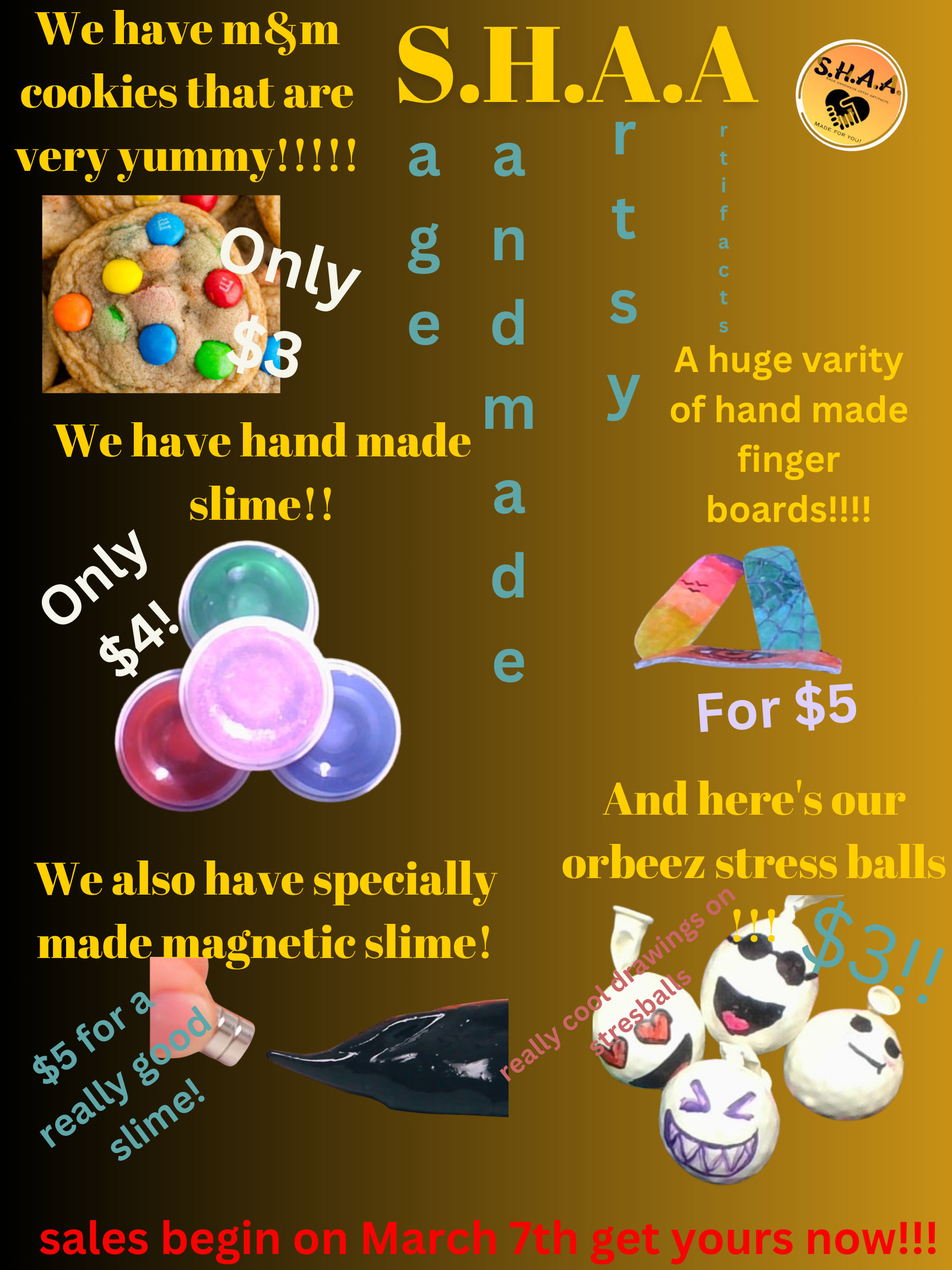
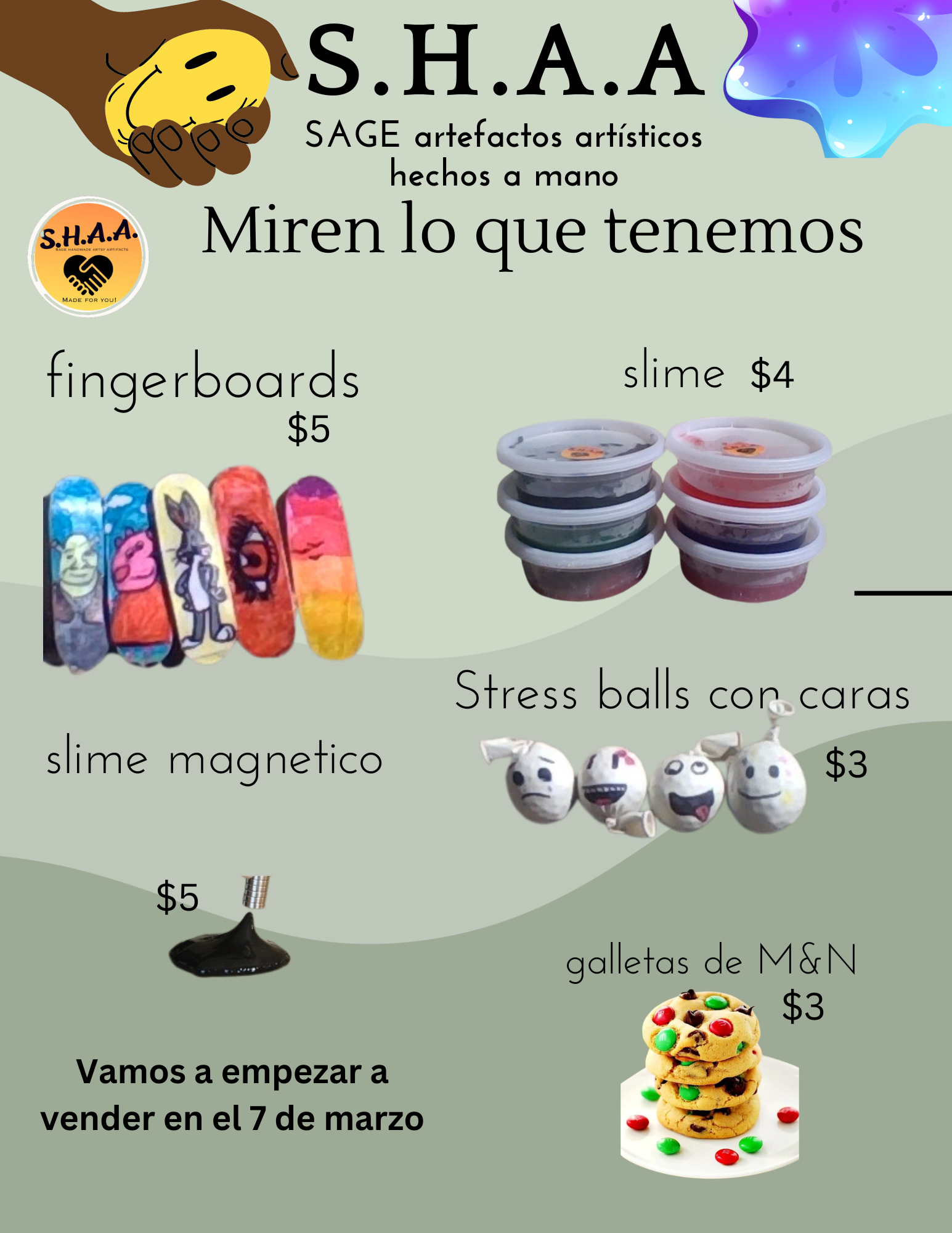
Creating a Business Logo and Sales Flyers
Using Canva, students made a business logo and sales flyers. Since we are a bilingual school, the flyers were made by the students in both English and Spanish.
Making Commercials
The 6th Graders made commercials using a green screen and iMovie to assist in sales as part of their media elective. Since we are a bilingual school, one was made in Spanish and the other in English
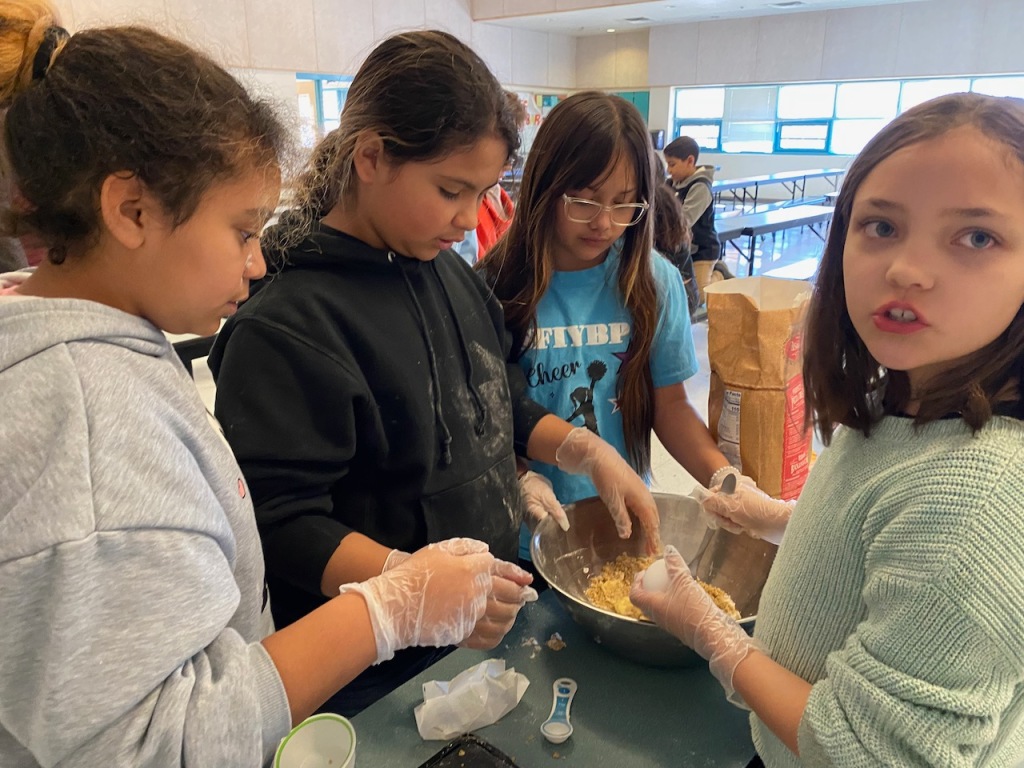
Highlights – Making and Packaging the Products
Here is a photo essay that shows the students making and packaging the products.




Highlights – Selling the Products
Counting Money – Financial Literacy
Students Delivering Raised Monies to The Interfaith Community Shelter (serves the homeless)
Standards Addressed
Framework for 21st Century Learning
Financial, Economic, Business, and Entrepreneurial Literacy
- Know how to make appropriate personal economic choices
- Understand the role of the economy in society
- Use entrepreneurial skills to enhance workplace productivity and career options
Common Core State Standards – Math (budgets and money management)
- Use place value understanding and properties of operations to perform multi-digit arithmetic.
- Use the four operations to solve word problems involving distances, intervals of time, liquid volumes, masses of objects, and money, including problems involving simple fractions or decimals, and problems that require expressing measurements given in a larger unit in terms of a smaller unit. Represent measurement quantities using diagrams such as number line diagrams that feature a measurement scale.
Common Core State Standards – ELA
- Present claims and findings, sequencing ideas logically and using pertinent descriptions, facts, and details to accentuate main ideas or themes; use appropriate eye contact, adequate volume, and clear pronunciation.
ISTE Standards for Students
- Students use a variety of technologies within a design process to identify and solve problems by creating new, useful or imaginative solutions.
- Students develop and employ strategies for understanding and solving problems in ways that leverage the power of technological methods to develop and test solutions.
NAGC Standards
- Students with gifts and talents demonstrate their potential or level of achievement in their domain(s) of talent and/or areas of interest.
- Students with gifts and talents develop knowledge and skills for living in and contributing to a diverse and global society.
- Students with gifts and talents demonstrate personal and social responsibility.
- Students with gifts and talents develop competence in interpersonal and technical communication skills. They demonstrate advanced oral and written skills and creative expression. They display fluency with technologies that support effective communication and are competent consumers of media and technology.
Additional Resources
- Ten Helpful Tips To Becoming An Kidpreneur [a kid that is an entrepreneur] https://www.huffingtonpost.com/entry/ten-helpful-tips-to-becoming-an-kidpreneur-a-kid-that_us_58d42f17e4b0f633072b35c6?ncid=engmodushpmg00000004
- Lesson Plans – Teaching Entrepreneurship http://www.teachingentrepreneurship.org/category/lesson-plans/
micro:bit Projects Coded with Python
I have a strong emphasis with a few groups of my gifted students in integrating physical computing into my instructional activities. I’ve discussed the benefits of physical computing in Scratch and Makey Makey Across the Curriculum.

As I have my students in my classes for several years during their 2nd through 6th grade education, I start teaching them block coding using MakeCode and Scratch in the early grades. As such, this year, due to a desire to advance their skills, I’ve begun having the students use Python for the micro:bit to combine physical computing and learning Python.
Python is an excellent first text-based language to learn. Its instructions and syntax are based on natural language, making code easy to read, understand and modify. As well as being widely used in education, it’s used in industry, especially in the areas of data science and machine learning. Python is not just used by software developers, but also by people working in fields as diverse as medicine, physics and finance. Python on the BBC micro:bit brings the benefits of physical computing to students aged 11-14, learning programming fundamentals through text-based coding: immersive, creative experiences for students that help build engagement and knowledge (https://microbit.org/get-started/user-guide/python-editor/).
Standards Addressed
ISTE Standards for Students
- Know and use a deliberate design process for generating ideas, testing theories, creating innovative artifacts or solving authentic problems.
- Develop, test and refine prototypes as part of a cyclical design process.
- Exhibit a tolerance for ambiguity, perseverance and the capacity to work with open-ended problems.
- Create original works or responsibly repurpose or remix digital resources into new creations.
Next Generation Science Standards
- Analyze data from tests to determine similarities and differences among several design solutions to identify the best characteristics of each that can be combined into a new solution to better meet the criteria for success.
- Develop a model to generate data for iterative testing and modification of a proposed object, tool, or process such that an optimal design can be achieved.
Math Standards
- Measure angles in whole-number degrees using a protractor. Sketch angles of specified measure.
- Graph points on the coordinate plane to solve real-world and mathematical problems.
Here are some of the projects they’ve completed:
Spoon Race Using the micro:bit Python Data Logger
The Egg and Spoon race is a game where a player carries an object (like an egg) across some distance without it falling out of a holder. In the case of the Egg and Spoon, the player must carefully walk with an egg held in a spoon. The egg must remain in the spoon until the player crosses the finish line. The egg can easily roll out of the spoon so the player needs skill and patience to balance the egg until finishing the race (https://makecode.microbit.org/examples/egg-and-spoon).
The micro:bit can be programmed to record data about how much shake occurs during the race. The winner is the one with the least amount of shake. See more about it at https://microbit.org/projects/make-it-code-it/python-wireless-data-logger/.
Thanks, Katie Henry and Jacqueline Russell, for this!
The code – https://drive.google.com/file/d/1gsc1ghanyL7CvXV6HQXnzJRcLVkFN3NU/view?usp=sharing.
FYI – the students absolutely loved this!
micro:bit Pal Coded with Python
The micro:bit is coded to make a pal. It is customized with different images and the built-in speaker to make it even more fun with its expressive sounds (music, expressive sounds, and speech).

The code – https://drive.google.com/file/d/1p8RIGQIGTLloAqXwjswdxlNFvkjDuF3_/view?usp=sharing.
micro:bit Warmer-Colder Game
In this old children’s game, one player hides an object hides an object that other player seeks to find. Temperature words tell them if they are moving towards the object (getting warmer) or away from it (getting colder). In this case, the micro:bit radio function is used by the hider to give hints through the micro:bit to the seeker.
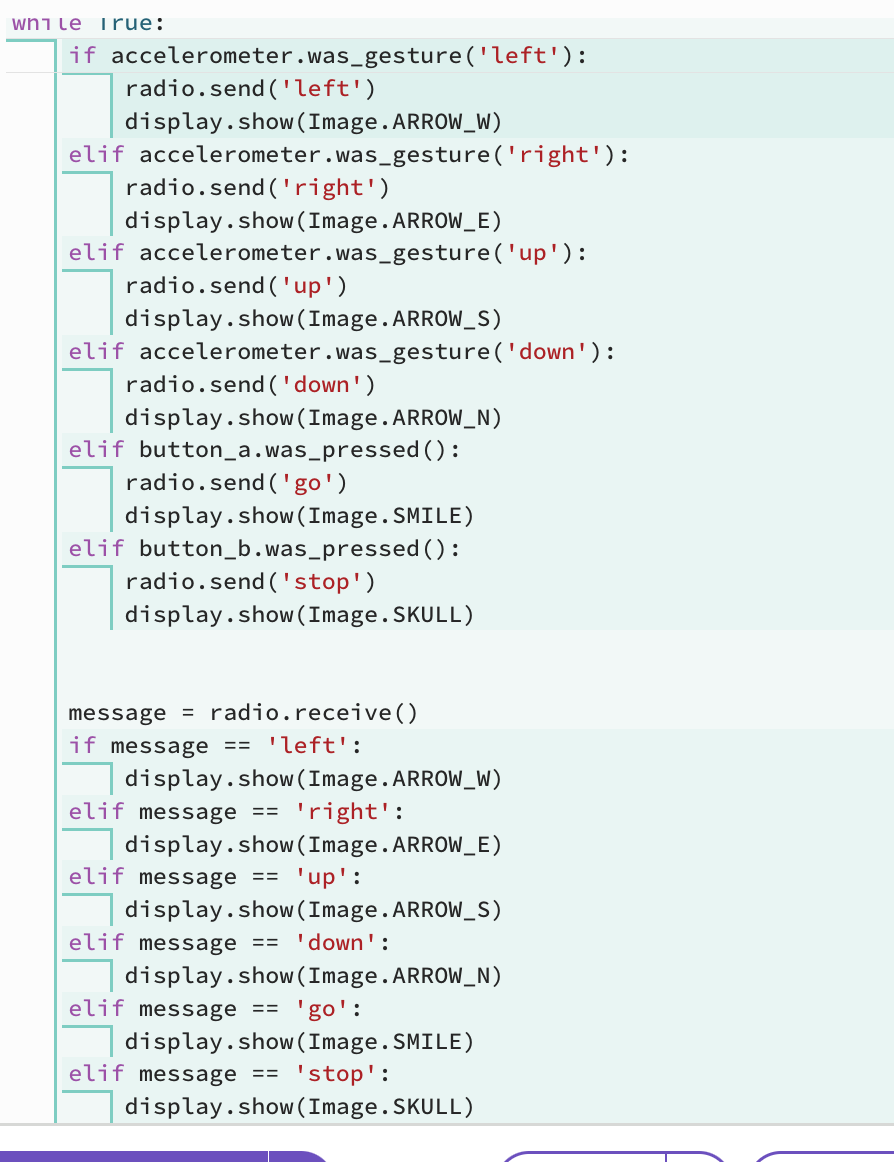
The code – https://drive.google.com/file/d/1-F8D9wx81r8ESqhi_KUA5zCy3L_8oPsQ/view?usp=sharing
Advanced micro:bit Projects: Artificial Intelligence/Teachable Machine, the Data Logger Spoon Race, and micro:bit Pal Coded with Python
I love bringing physical computing into my classrooms:
Physical computing refers to the use of tangible, embedded microcontroller-based interactive systems that can sense the world around them and/or control outputs such as lights, displays and motors. Assembling the hardware elements of a physical computer and programming it with the desired behavior provides a creative and educational experience. A variety of physical computing devices are established in the market, including: Arduino, Raspberry Pi, Circuit Playground, and the BBC micro:bit (https://www.microsoft.com/en-us/research/project/physical-computing/)

. . . but as with all use of educational technologies, I believe that it should be used intentionally to assist learners in developing and expanding their content knowledge and life skills.
Standards Addressed
ISTE Standards for Students
- Know and use a deliberate design process for generating ideas, testing theories, creating innovative artifacts or solving authentic problems.
- Develop, test and refine prototypes as part of a cyclical design process.
- Exhibit a tolerance for ambiguity, perseverance and the capacity to work with open-ended problems.
- Create original works or responsibly repurpose or remix digital resources into new creations.
Next Generation Science Standards
- Analyze data from tests to determine similarities and differences among several design solutions to identify the best characteristics of each that can be combined into a new solution to better meet the criteria for success.
- Develop a model to generate data for iterative testing and modification of a proposed object, tool, or process such that an optimal design can be achieved.
Math Standards
- Measure angles in whole-number degrees using a protractor. Sketch angles of specified measure.
- Graph points on the coordinate plane to solve real-world and mathematical problems.
Artificial Intelligence, the Teachable Machine, and micro:bits
Thanks, Cora Yang, for this!
The Data Logger Spoon Race with micro:bits and MakeCode
Thanks, Katie Henry and Jacqueline Russell, for this!
The micro:bit Python editor can also be used to code the data logger for the spoon race:

micro:bit Pal Coded with Python
Python is an excellent first text-based language to learn. Its instructions and syntax are based on natural language, making code easy to read, understand and modify. As well as being widely used in education, it’s used in industry, especially in the areas of data science and machine learning. Python is not just used by software developers, but also by people working in fields as diverse as medicine, physics and finance. Python on the BBC micro:bit brings the benefits of physical computing to students aged 11-14, learning programming fundamentals through text-based coding: immersive, creative experiences for students that help build engagement and knowledge (https://microbit.org/get-started/user-guide/python-editor/).
Here is a micro:bit pal coded with Python example that I will share with my students:
. . . and the code is:


Here are some student micro:bit pals coded with Python:
Workshop: Using Makey Makeys and micro:bits Across the Curriculum
This is an overview of my workshop at FETC (Future of Technology Education Conference).

Description from the Conference Program

Workshop Slides
Wakelet of Workshop Resources

 Jackie Gerstein, Ed.D.